

Stainless Steel Sublimation: Factory Coatings, Repeatable Batches

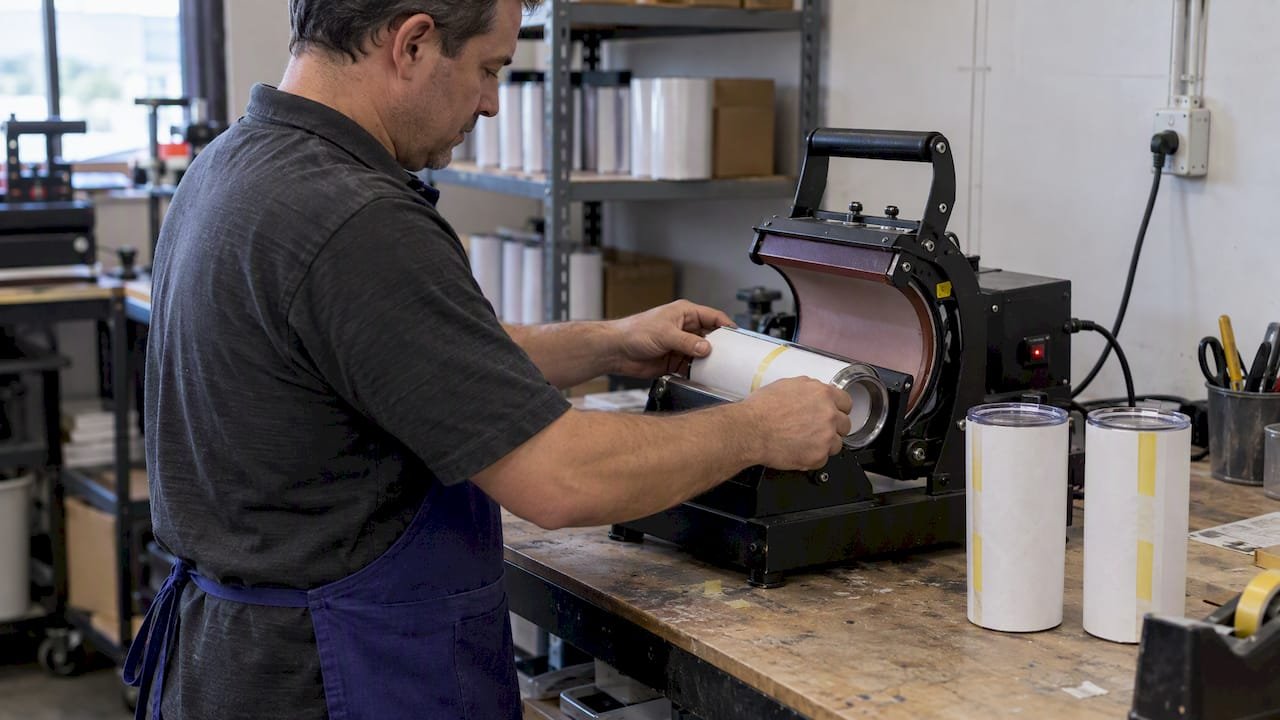
Yes, you can do sublimation on stainless steel, but only on blanks that carry a polyester sublimation coating, because bare steel will not accept the dye. You need a sublimation printer with dye-sub ink, transfer paper, a heat source, and heat tape. A mug press suits partial designs, while a convection oven with shrink-wrap or a tumbler press handles full wraps.
TL;DR:
- Choose factory coated blanks over DIY layers for repeatable results; white coatings preserve color, while clear coatings let the metal show through and shift tones.
- Use a mug press for centered or partial designs; full wraps need an oven with shrink film or a tumbler press sized to the blank.
- Tape the transfer firmly at several points, wrap it tightly for even contact, and cool the cup immediately after pressing to prevent ghosting.
- Polar Camel recommends 405°F for 6.5–8.5 minutes as an oven starting point; verify actual heat, then adjust time or temperature one step at a time.
- When a print is faint or uneven, first confirm the coating, then check ink density, actual temperature, and wrap pressure before changing settings.
Table of Contents
- Which stainless steel blanks actually work for sublimation?
- Which heat method should you choose?
- How do you prepare the tumbler for transfer?
- What printer, ink, and paper do you need?
- What temperature, time, and pressure should you start with?
- How do you fix ghosting, faint images, and uneven color?
- How do you get repeatable results from batch to batch?
- What safety precautions should you follow?
- Why I favor factory-coated blanks
- Where can you source sublimation-ready drinkware in bulk?
- FAQ
- Sources
Which stainless steel blanks actually work for sublimation?
Dye-sublimation bonds to polyester or polyester-coated hard goods. Epson’s guidance is plain: the process does not work on raw, uncoated metals or on dark substrates that lack a white or light coating to show the colors. Practitioners say the same thing from the bench. Bare stainless is non-porous, so the ink has nothing to infuse into, and factory-coated blanks are the reliable route while home-applied coatings stay inconsistent and unpredictable.
The coating you choose changes how the finished piece looks:
- White-coated blanks give true-to-color prints, because the coating acts as a bright canvas for the dye.
- Clear-coated stainless steel lets the metal show through, so designs pick up a metallic finish and colors read differently than they do on your screen.
- Double-walled, vacuum-insulated tumblers are widely sold factory-coated, but check the diameter and height before you buy, since your press has to accept the blank.
- Known sublimation-ready blanks beat DIY coatings for repeat work, because every cup responds the same way to the same settings.
Forum threads from makers who tried to coat steel themselves tell a consistent story. Community reports say the inks only adhere to polyester coatings and that home-applied layers take a lot of trial and error. Industry literature explains why factory results look so even: patent filings on printable stainless steel describe layered resin coatings applied under controlled processing to get durable adhesion, which is hard to match at a kitchen table.
Pro Tip: Buy a small sample pack of two or three blank styles before committing to a large order, and press one of each with the same test image to see how the coating handles your gear.
If you want to see what finished, factory-built stainless drinkware looks like, our insulated stainless tumbler with straw is a good example of the category.
Which heat method should you choose?
Your design and your equipment decide this. A mug press delivers quick, high-pressure results for smaller or partial designs, while a convection oven with shrink-wrap is the expert choice for full-wrap designs because it keeps constant pressure across the whole surface. Here is how the three options compare in practice:
- Mug press: Fast and simple, with good results on logos, names, and partial graphics. The hinge leaves a small gap, so a seamless edge-to-edge wrap is not realistic.
- Convection oven plus shrink-wrap: The best route for seamless full wraps. It needs shrink film, careful wrapping, and patience, and it asks more of you at setup than a press does.
- Dedicated tumbler press: A middle ground that gives consistent coverage when you make volume. It only works when the press matches your tumbler size, so check the specs first.
Fit is the constraint that catches most beginners. Not every tumbler fits a mug press: some are made to fit presses, while others need an oven-based process. Many mug presses will not take large 30 oz tumblers at all. If you are buying a large drinkware blank, such as a 30 oz recycled tumbler, measure it against your press opening before you plan the workflow.
A simple way to decide: if you are making a handful of cups with a centered logo, a mug press is the cheaper entry. If your art wraps all the way around, plan on the oven with shrink film or invest in a tumbler press sized for your blanks. Many makers start with a mug press and add the oven method once they want full-wrap designs.
How do you prepare the tumbler for transfer?
Careful prep prevents most failed presses. Work through this checklist in order:
- Clean the coated surface. Wipe off fingerprints and oils with a lint-free cloth. Use isopropyl alcohol if your blank supplier recommends it, and avoid anything abrasive that could scratch the coating.
- Trim the transfer. Contour-cut the printed paper so it hugs the area you plan to cover, which makes wrapping smoother and reduces overlap.
- Position the artwork. For tall tumblers, many makers start about 1/2" down from the top edge so the design clears the lip and the lid area.
- Tape it down. Secure the transfer with heat-resistant tape at several points so it cannot shift. Movement during the press is a classic cause of blurred edges.
- Add scratch paper. Place a layer between the transfer and the press pad to protect the pad from stray ink.
- Wrap for even pressure. Use a silicone wrap or shrink film to hold the paper tight against the coating and keep the pad from touching the printed ink directly.
Shrink film does the heavy lifting for oven work. The can cooler workflow from Graphics Pro shows the pattern clearly: secure the transfers, shrink the film down with a heat gun, then press in the oven. The same logic scales up to full-size tumblers, and it works because the film pulls tighter as it heats, which keeps contact consistent.
Take your time at the wrapping step. A transfer that looks perfectly placed can still slide when you handle the cup, so rotate the tumbler slowly and check that the paper edges meet cleanly where they overlap. A crooked seam at this stage becomes a visible line on the finished cup.
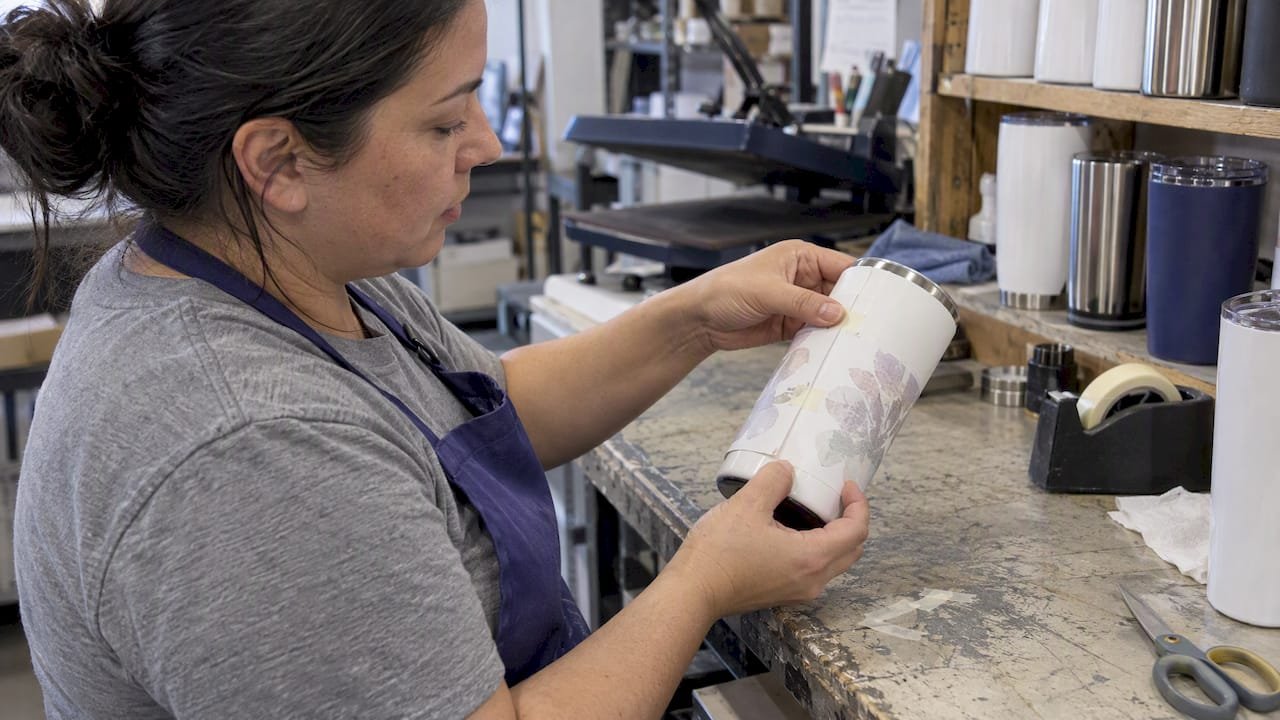
Pro Tip: Do a dry fit before you tape anything. Hold the trimmed transfer against the tumbler, confirm the seam lands where you want it, and mark the top edge lightly on the back of the paper so your placement is repeatable.
If you plan to run several cups in a row, set up a small station: cleaning cloths, tape, scratch paper, and film all within arm’s reach. A repeatable layout cuts handling time, and less handling means fewer fingerprints on the coating.
What printer, ink, and paper do you need?
Dye-sublimation needs a printer loaded with dye-sub ink and compatible transfer paper. Epson describes sublimation as a process built around that pairing, so match your paper to your printer manufacturer’s recommendation instead of mixing random supplies. Good habits at the print stage save you from chasing problems later at the press:
- Start from supplier templates. Blank suppliers often publish artwork templates sized to their tumblers. Use them first, then adjust to your taste.
- Mirror when required. Most transfers must be printed in reverse so the image reads correctly on the cup. Check your design software’s setting before every print.
- Nest your layouts. Arrange several designs on one sheet to save paper, leaving enough margin around each for trimming and taping.
- Let prints dry fully. Handling a damp transfer smears the ink and creates artifacts that show up as smudges on the finished cup.
- Use profiles for predictable color. Start with the profile recommended by your ink or paper supplier, then fine-tune based on test results.
Resolution matters more than people expect on a curved surface. Use the highest-quality print setting your printer offers, and keep image files sharp, since any softness gets magnified when the paper wraps around a cylinder. Remember too that coating color limits your palette: bright, saturated art looks best on white, while clear coatings shift the tones, so run a test strip before a full batch.
Store unused paper flat and sealed, away from humidity, and keep your printed sheets in a clean folder until pressing day. A fingerprint on the printed side transfers just as faithfully as the artwork does.
Finally, keep a few spare transfers of every design. Nothing wastes more time than realizing a single press went wrong and having to reprint, wait for drying, and trim again.
What temperature, time, and pressure should you start with?
Treat every number here as a starting point. Machines, ink, paper, and even room conditions change the right answer, so verify actual heat with an independent thermometer and adjust in small steps. Representative baselines from industry guides:
The mug press numbers come from Graphics Pro’s tumbler guide, and the can cooler example comes from the stainless can cooler tutorial. Notice that the time ranges differ because the products differ: a thin can cooler heats through quickly, while a double-walled tumbler holds heat in its body and needs more dwell.
Manufacturer baseline: Polar Camel’s recommended oven setting of 405°F for 6.5–8.5 minutes is a sound place to begin, with dwell time calibrated to your specific oven, ink, paper, and atmospheric conditions.
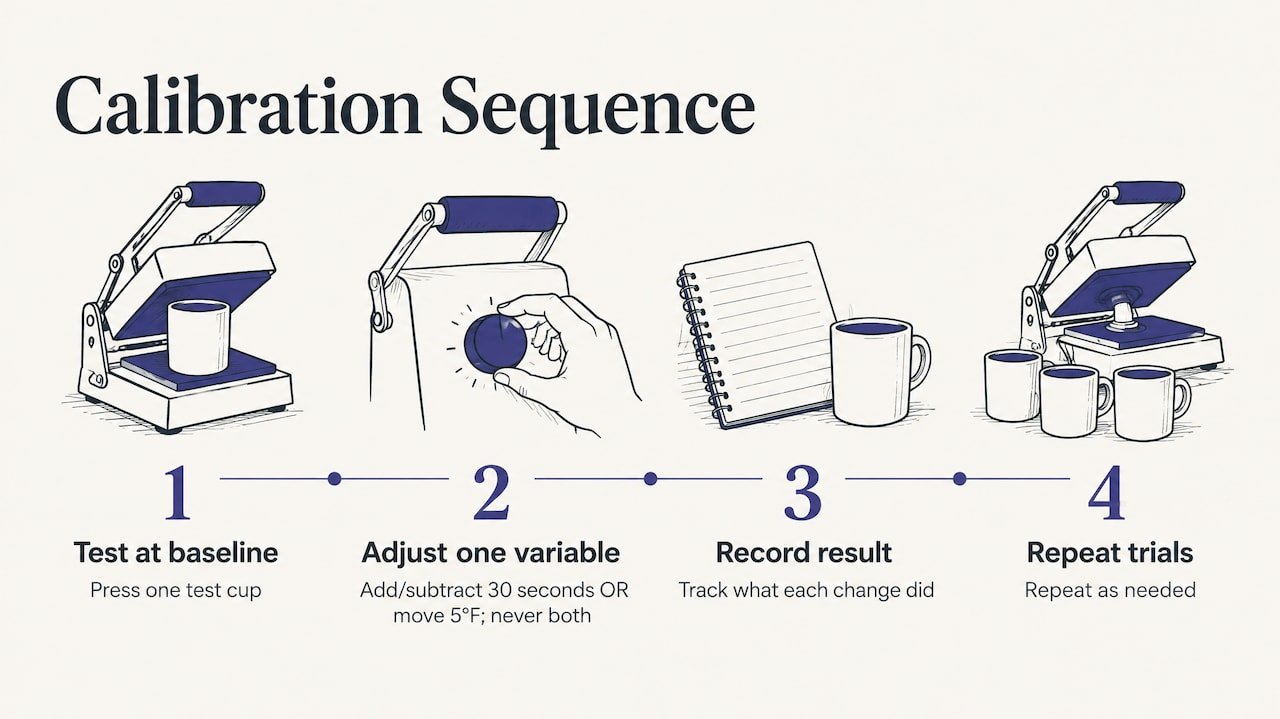
Calibrating takes only a few steps. Press one test cup at the baseline, then change one variable at a time: add or subtract 30 seconds, or move the temperature by 5°F, never both at once. Write down the result of each trial so you know which change did what.
Pressure deserves its own note. Thin-walled tumblers can bend or deform if you clamp them too hard in a press, so start light and increase gradually. Wraps help here, because they spread the force evenly around the cup instead of concentrating it where the press touches.
Cooling is the step beginners skip. As soon as the cup comes out, cool it with a fan or a water bath to halt sublimation and prevent ghosting, where a second faint image appears beside the sharp one. Put on heat-resistant gloves first, remove the wrap and tape while the cup is still warm but handleable, peel the paper off in one smooth motion, and then cool the cup. Movement while the dye is still active smears the design, so keep the paper locked in place until you pull it off.
How do you fix ghosting, faint images, and uneven color?
Most problems trace back to a short list of causes. Start with the likely culprit instead of changing every setting at once, which only hides what went wrong. Research on hard-substrate sublimation points the same way: successful metal sublimation infuses dye into a surface coating, and common failures come from incorrect temperature or pressure, uneven coating on generic blanks, or trying to use bare metal.
- Ghosting (a doubled or blurry edge): Usually movement during the press or slow cooling. Tape more securely, wrap tighter, and cool the cup immediately after removing the paper.
- No transfer or a faint image: Check that the blank really has a sublimation coating. After that, look at low ink density, the wrong printer profile, or too little heat or time.
- Uneven color: Often inconsistent coating quality or uneven pressure. Factory-coated blanks fix the first cause, and checking wrap tension fixes the second.
- Blown-out or dull colors: A sign of too much or too little dwell time. Adjust in small increments and compare against your test strip.
When something fails, run through a short diagnostic: confirm the blank’s coating, reprint a small test strip, verify actual temperature with a thermometer, and adjust dwell time and pressure one step at a time. That sequence removes guesswork, because each check eliminates one variable. If a blank from a new supplier behaves oddly while your usual blanks press fine, suspect the coating first and test a known-good blank side by side.
How do you get repeatable results from batch to batch?
Consistency comes from habits, not luck. A few small routines turn one lucky cup into a dependable small-batch process:
- Keep a settings log. Record temperature, time, pressure, wrap method, and blank type for each press, and note the outcome. The next time you use that blank, you start from a proven recipe.
- Label batches and templates. Name your files and mark your transfer sheets so designs never get mixed up between orders.
- Run a quick quality check. Before packing a cup, inspect seam smoothness, color vibrancy, and lid fit.
A good log pays for itself quickly. When a supplier changes a coating or you swap ink brands, you will see exactly which setting needs to move, rather than starting from scratch.
Pro Tip: Press a test cup at the start of every session and compare it to a saved reference cup. If the colors differ, adjust before you run the whole batch.
What safety precautions should you follow?
Sublimation involves high heat, so protect yourself at every step. Do not handle hot tumblers or shrink film until you have checked and followed the applicable manufacturer safety instructions. Before pressing, consult the blank, coating, ink, and equipment manufacturers’ instructions for safe preparation and operation. If you are unsure how to handle a hot item safely, do not proceed.
Why I favor factory-coated blanks
After weighing the evidence from manufacturers and makers, my view is simple: pay a little more for factory-coated blanks and spend your time on design instead of troubleshooting coatings. Consistency is what turns a hobby into a reliable small business, and a uniform coating makes your logged settings actually repeatable. Expect small adjustments between suppliers, and write down every success, because a documented recipe saves hours.
— Jerry
Where can you source sublimation-ready drinkware in bulk?
If you need finished, branded tumblers for an event or a corporate gifting program instead of pressing every cup yourself, we can help. We sell and distribute drinkware, handle bulk orders, and support rush orders, with fulfillment to a single location or several. Our positioning is straightforward: we aim to offer competitive savings, with curated quality from trusted suppliers.
Reach out to us with fulfillment questions as you plan a drinkware order. If you want ideas first, read our guides on branded tumblers for employees and custom tumblers versus water bottles to see how different styles fit different programs. Current prices are on our site, so contact Discountswag through our storefront with your quantity and deadline, and we will point you to the right drinkware.
FAQ
What material works for sublimation printing?
Dye-sublimation works on polyester fabric and on hard goods with a polyester coating. It does not work on raw, uncoated metals, per Epson’s guidance. For metal drinkware, choose blanks sold as sublimation-ready.
Can you sublimate on a stainless steel tumbler?
Yes, as long as the tumbler has a factory polyester coating. Bare stainless is non-porous and cannot accept the ink, which is why coated blanks are the dependable choice.
What are examples of sublimation?
Common examples include sublimated mugs, stainless steel tumblers, can coolers, and other coated hard goods. Makers also use the process on polyester apparel and similar items. This article focuses on drinkware because it is where crafters most often get started.
Which heat method is best for a full-wrap design?
A convection oven with shrink-wrap is generally the expert pick for full wraps, since it holds constant pressure across the whole surface. A tumbler press sized to your blank is a good alternative for volume.
Sources
- Sublimation Printers for Beginners & Small Business | Epson US
- How to Sublimate 20-oz. Polar Camel Tall Tumblers in a Mug Press
- Sublimation On Stainless Steel Tumbler Or Mugs In 2 Ways
 Bottle Carriers
 Mugs
Mugs