


DPI for Logo Printing: What to Send and What to Skip

For a raster logo (PNG, JPG), 300 DPI at the final print size is the standard to aim for. For a vector logo (AI, EPS, SVG, or a PDF that still holds vector paths), DPI does not apply, because the artwork is math, not pixels. If you can send a vector file, send it and stop worrying about the number.
That short answer hides a few traps that cause most blurry imprints on shirts, mugs and pens. This guide covers what DPI means, why changing the setting in Photoshop does not fix a small file, and how to check your logo before you place a bulk order.
TL;DR
- Vector first. Vector formats like SVG and EPS are resolution-independent, so they scale to any size without losing quality.
- Raster fallback: build the file at the actual print size at 300 DPI. A 3-inch-wide imprint needs about 900 pixels across.
- Changing 72 to 300 in Photoshop adds nothing. It only changes how the same pixels are labeled, so a small web logo stays soft.
- Watch your export settings. Layout software can silently downsample images and ruin a good logo.
- Printer specs are not file specs. A printer’s 4800 or 5760 DPI figure describes its hardware, not what your artwork needs.
Table of Contents
- What DPI actually measures
- Why 300 DPI became the standard
- 300 DPI vs. 72 DPI: where the myth comes from
- The better answer: send a vector file
- Raster logos: how to prepare one properly
- The sneaky causes of a blurry logo
- Do printer DPI specs matter?
- DPI is not the only thing a decorator needs
- Our perspective: fix the file before the order, not after
- Ordering logo products with us
- A quick pre-flight check
- FAQ
- Sources
What DPI actually measures
DPI stands for dots per inch. Strictly, it describes an output device: how many dots of ink a printer places in one inch. PPI, pixels per inch, describes the digital file. Printers often use the terms interchangeably in conversation, and when a print shop asks for a “300 DPI file,” it means a file with 300 pixels for every inch of the printed size.
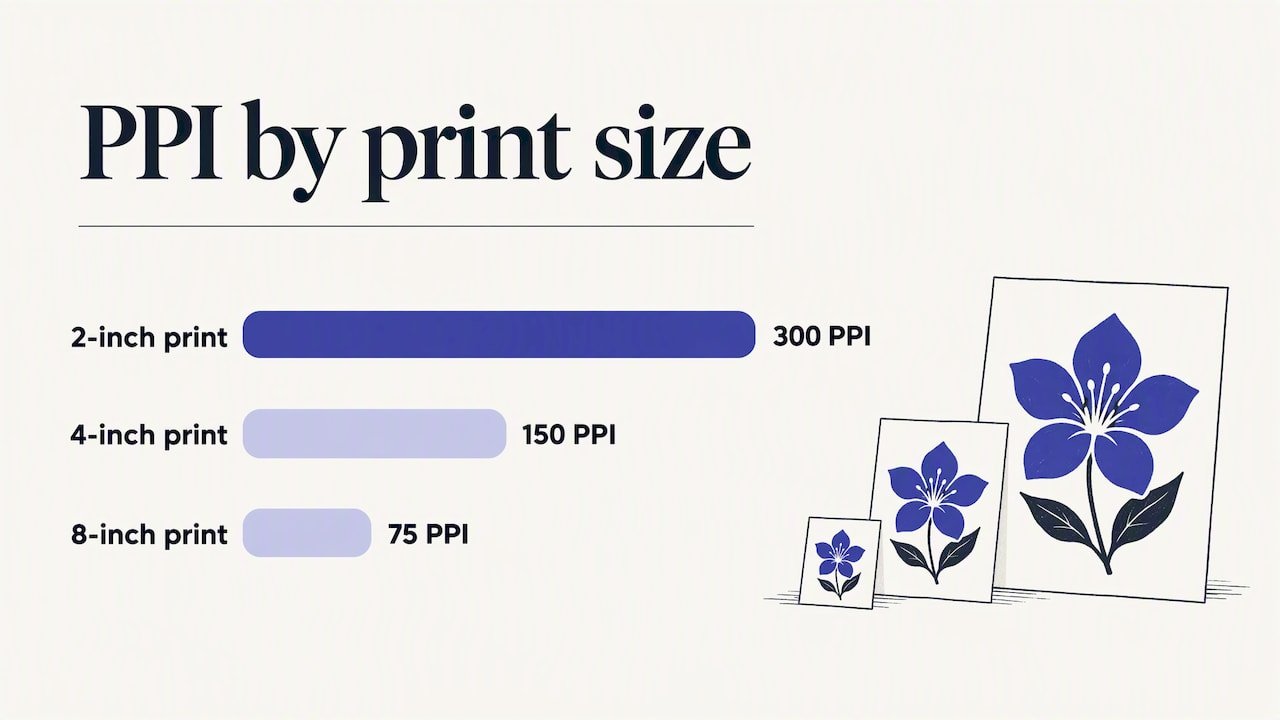
The key idea is that resolution is a relationship, not a property of the file alone. It equals pixel dimensions divided by print size. The same 600-pixel-wide logo is 300 PPI at 2 inches wide, 150 PPI at 4 inches, and 75 PPI at 8 inches. The label in the file metadata is just a default. What counts is how many pixels you have for the size you will print.
Why 300 DPI became the standard
The 300 figure is not arbitrary. It is tied to human vision: at a normal reading distance of about 12 inches, individual dots stop being visible at roughly this density. That is why 300 DPI is the generally accepted minimum for crisp output on items such as mugs, badges and notebooks.
A few practical notes:
- Going far above 300 rarely helps for a logo. It makes the file larger without a visible gain.
- Going below roughly 150 starts to show. Edges look stepped, curves look rough, and small text fills in.
- Some jobs ask for a different number. Always follow a specific request from the decorator over a general rule.
300 DPI vs. 72 DPI: where the myth comes from
The 72 DPI figure is a legacy of early screens. Web images are measured in pixels, and the DPI tag in a web file does nothing on a screen. A logo exported as “72 DPI” is not inherently bad. It is usually just small, for example 400 pixels wide, because that is enough for a website header.
The problem arrives when that file goes to a decorator. At 300 PPI, 400 pixels cover only 1.33 inches. Stretch it to a 3-inch left-chest print and you are at about 133 PPI, which will look soft.
Here is the number a lot of people get wrong. Opening the 400-pixel file in an image editor and typing 300 into the resolution box, with resampling off, changes nothing about the print. Raising the DPI setting does not add detail to a low-quality file. If you resample to force more pixels, the software invents them by averaging neighbors, and the result is larger but blurrier.
Pixel math you can do in 30 seconds
Multiply the print width in inches by 300. That is the pixel width you need.
| Imprint width | Pixels needed at 300 PPI |
|---|---|
| 1 inch (pen barrel, USB drive) | 300 |
| 2 inches (small badge, cap front) | 600 |
| 3 inches (left chest) | 900 |
| 4 inches (tote or mug wrap section) | 1,200 |
| 10 inches (full-chest print) | 3,000 |
Compare those numbers with your file’s pixel dimensions, which any image viewer shows. If your file is smaller than the table says, it is too small for that placement. Your options are to find a larger original or get a vector version. For typical imprint sizes by product, our guide to imprint area and file prep is a useful companion, and the shirt logo size and pixel specs page covers apparel placements specifically.
The better answer: send a vector file
When marketing teams ask what DPI a logo should be, the most useful reply is often “it should not have one.” Vector files such as AI, EPS, SVG and vector PDF describe shapes with mathematical paths. The printer’s raster image processor renders those paths at the machine’s own native resolution, so there is no pixelation to worry about, however big or small the imprint.
How to tell what you have
- Check the extension. AI, EPS and SVG are vector. JPG, PNG, GIF and PSD are raster.
- Be careful with PDF. A PDF is a container. It can hold vector paths or a flattened picture. Open it in Illustrator or a PDF viewer and zoom to 800 percent. Sharp edges mean vector. Squares mean raster.
- Ask your brand or design team. The master logo files usually live with whoever built the brand guidelines. A logo that was drawn in Illustrator almost certainly has a vector master.
If you do not have a vector, it is worth finding one before a large order. A logo redrawn as a vector is a one-time job that pays off on every product you order afterward. For a rough sense of what a designer charges, one UK agency publishes logo design cost ranges in pounds, which are UK prices and not US ones, but they show the scale of the work compared to a reprint.
Raster logos: how to prepare one properly
Sometimes a raster is all you have, such as a photographed sign or an old JPG. Then:
- Find the largest original. Check the email attachment from the agency, the original download, or the file that was used for an earlier print job.
- Calculate the pixels you need with the table above.
- Do not upscale. Stretching a small 72 DPI web logo and relabeling it at 300 DPI only stretches existing pixels.
- Prefer PNG with a transparent background over JPG, which adds compression artifacts around edges and puts a white box behind the logo.
- Flag it when you submit. Telling the decorator the file is a raster lets them judge it before production, not after.
The sneaky causes of a blurry logo
Sometimes the file looks right but prints badly. Two causes come up often.
Flattened vectors
A vector logo that was exported to PNG and then placed into a PDF is now a raster, no matter what the final file claims. Adobe community experts describe print shops flagging files as pixelated even when their metadata reads over 1000 PPI. The advice is consistent: do not convert a logo to a raster image for print unless you cannot avoid it.
Downsampling on export
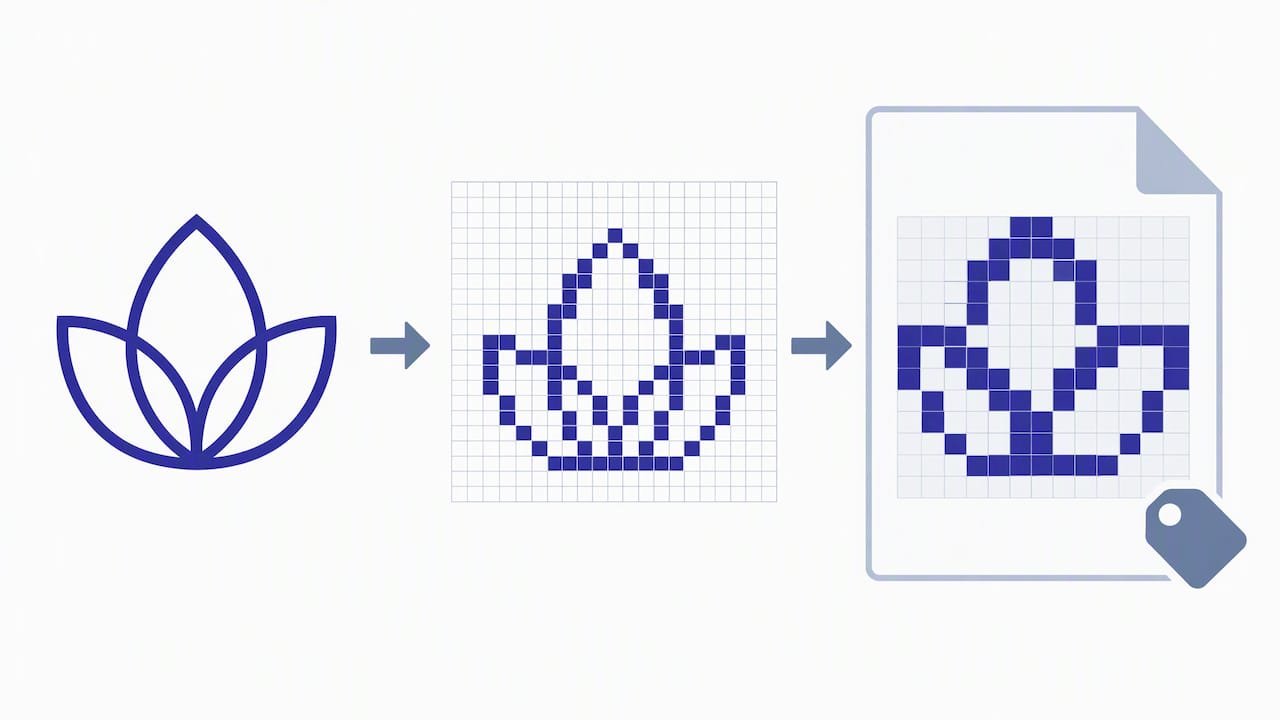
Layout software can shrink images during PDF export. Adobe InDesign presets, for example, can downsample images above a set threshold such as 450 ppi down to 300 ppi. In one community thread, a user’s vector artwork looked low resolution after a high-quality print export. If you build a one-sheet or a proof in a layout tool, check the export preset and turn downsampling off for logo assets.
A wider point applies here too. Keeping brand visuals consistent across channels is a discipline in itself, and these visual storytelling tips for brand impact are a reasonable read for the creative side of the job.
Do printer DPI specs matter?
Not for your artwork. You will see big numbers on printer spec sheets. One Epson consumer inkjet lists a maximum print resolution of 5760 x 1440 optimized dpi, while a thermal receipt printer is rated at 180 dpi. Those are hardware figures for how ink or heat is deposited. They are not the resolution your file needs. Sending a 5000 DPI logo does not make the print better than a clean 300 PPI file at final size.
DPI is not the only thing a decorator needs
Resolution is one item on a longer file checklist. Different decoration methods ask for different things, and the exact requirements vary by product and supplier, so confirm them before you finalize artwork.
- Colors. Know your brand’s Pantone references, if you use them, and have the CMYK and RGB values on hand.
- Fonts. Outline the text in vector files so a missing font does not change the lettering.
- Variations. One-color, reversed and stacked versions of the logo often fit small or dark items better than the full-color master.
- Minimum detail. Thin lines and tiny text can vanish on textured items or in embroidery, whatever the DPI. Simplify for small imprints.
- Placement and size. A logo that works across a banner may need rework for a pen barrel.
For a full pre-order list, use our bulk order promotional product checklist, and see how to order promotional products right for the wider process. Drinkware has its own wrap-area quirks, covered in our logo drinkware ordering guide, and apparel placement is covered in the logo apparel buying guide.
Our perspective: fix the file before the order, not after
We distribute corporate promotional products, and the pattern we see in this topic is simple: artwork problems are cheap to fix on a Tuesday afternoon and expensive to fix after a production run. A marketing manager who has the vector master in a shared folder can approve a rush order without stress. One who has only a screenshot from the website cannot.
Our advice has three parts. First, keep one folder with the vector logo, one-color and reversed versions, and the brand color values, and give procurement access to it. Second, when a vendor asks for a DPI number, answer with the file type first and the pixel size second. Third, before a large order, ask for a proof and look at the logo at full zoom, not as a thumbnail. We also built our distribution around curated products from trusted suppliers because a sharp logo still needs a good blank to sit on.
— Jerry
Ordering logo products with us
If you are buying branded apparel, drinkware, bags, tech or event swag in volume, Discount Swag offers customization, rush orders, branded kits and fulfillment to single or multiple locations, along with a guarantee of 10% or more savings versus any competitor’s online price. Have your vector logo ready, pick your products, and you can move from artwork to order without a second round of file fixes.
A quick pre-flight check
Run through this list before you send artwork to anyone:
- Do I have a vector master (AI, EPS, SVG or true vector PDF)?
- If only a raster exists, is it at least 300 pixels per inch of the largest print size?
- Was it ever upscaled, or flattened from a vector?
- Is the background transparent where it should be?
- Are fonts outlined and colors specified?
- Did I request a proof and view it at full size?
If you answer yes to the first and last, you are in good shape, whatever DPI the file claims.
FAQ
What DPI should I use for a logo?
For a raster logo, use 300 DPI (pixels per inch) at the final print size. For a vector logo, no DPI is needed, since the printer renders it at its own native resolution. Always send the vector master if you have one.
Is 300 DPI better than 72 DPI?
For print, yes, but only because it implies more pixels for the same physical size. A 72 DPI label on a very large pixel image can print fine, and a 300 DPI label on a tiny image will not. Judge a file by its pixel dimensions against the print size.
Can I convert a 72 DPI logo to 300 DPI?
You can change the label, but you cannot add real detail. Resampling only creates larger, softer pixels. Look for a larger original or ask for a vector version instead.
What DPI is needed for t-shirt printing?
A 300 PPI raster at the actual print size is the usual target, so a 10-inch-wide full-chest design needs about 3,000 pixels across. Vector art avoids the issue, and individual decorators may set their own requirements, so check with yours.
Sources
- Logo Resolution and DPI Explained for Print and Web
- Beginners Guide To DPI vs PPI
- Why my image is pixilated when printing when the effective ppi is more than 1000? (Adobe Community)
- My PDF export is lower resolution than high-quality viewing of InDesign document (Adobe Community)
- Epson Expression ET-2600 EcoTank All-in-One Printer
- Epson OmniLink TM-T88VI-i Intelligent Thermal Receipt Printer
 Bottle Carriers
 Mugs
Mugs