

Custom USB Drives: What Marketers Need to Know

A custom USB drive is a standard flash memory stick personalized with a brand’s logo, colors, or shape, and often preloaded with digital content. Think of it as commodity flash storage dressed for a campaign. Marketers, event teams, HR departments, and agencies buy them by the hundreds to put branded, useful technology directly into recipients’ hands. The industry term you’ll see on spec sheets is “promotional USB flash drive,” though SanDisk notes that “thumb drive,” “flash drive,” and “USB drive” are used interchangeably in everyday conversation.
The four things that make a drive “custom” rather than a plain retail stick are:
- Logo imprinting via pad printing, laser engraving, or full-color digital print
- Custom shape or color, from a standard swivel shell in brand colors to a fully molded 3D shape
- Preloaded files, including product videos, press kits, onboarding documents, or auto-run menus
- Branded packaging, from poly bags to custom gift boxes
Discountswag supplies custom USB drives alongside a full range of corporate promotional products, with bulk pricing, artwork setup, and fulfillment to single or multiple locations.
Key Takeaways
Custom USB drives combine commodity flash storage with physical branding and optional preloaded content, making them one of the most versatile promotional items for marketers, event teams, and HR departments.
| Point | Details |
|---|---|
| Definition | A custom USB drive is a standard NAND flash device personalized with logo imprinting, custom color or shape, and optional preloaded files. |
| Capacity guidance | Match storage to content: 2–4 GB for documents, 8–16 GB for most mixed media, 32 GB+ for large video or asset packs. For general purpose and rich media promotions, 8–16 GB USB 2.0 is the common, practical choice. |
| Imprint method matters | Laser engraving lasts longer on metal; pad printing is fastest and cheapest for high-volume plastic runs. |
| Lead time planning | Standard pad-printed shells ship in 5–7 business days after artwork approval; custom-molded shapes add 2–3 weeks for tooling. |
| Data preloading safety | Verify copyright clearance, scan for malware, and require checksum verification from your supplier before accepting the order. |
| Discountswag | Handles product selection, artwork proofing, data preloading, and multi-location fulfillment for bulk custom USB orders. |
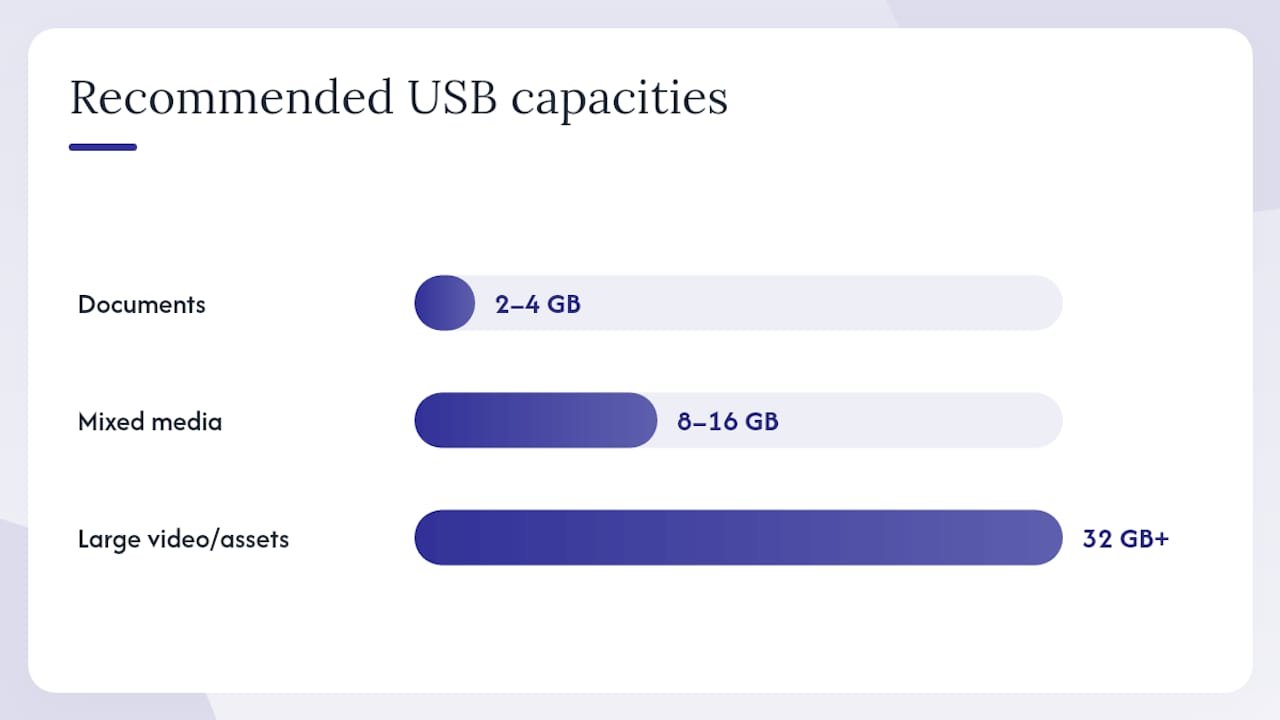
Table of Contents
- What is a custom USB drive made of?
- What can you actually customize on a USB drive?
- Which styles and materials should you choose?
- How do storage size and USB version affect your order?
- How do businesses actually use custom USB drives?
- What drives the cost of a bulk USB order?
- How does data preloading work, and what are the risks?
- Artwork checklist: what to prepare before you order
- What are the eco-friendly options for custom USB drives?
- What should you expect from a reputable USB drive supplier?
- What most buyers get wrong about custom USB drives
- Discountswag makes bulk USB orders straightforward
- Sources
What is a custom USB drive made of?
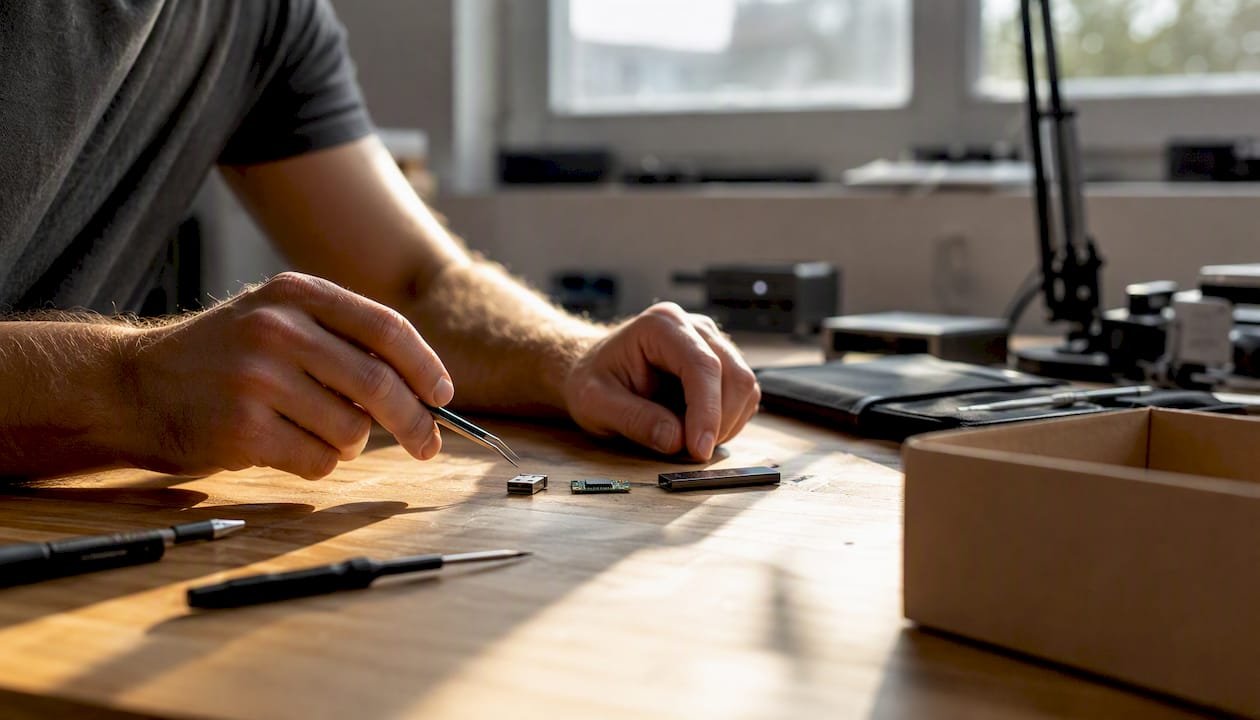
Every USB flash drive, custom or not, is built from the same handful of parts. Wikipedia’s USB flash drive entry describes the core assembly: a USB connector, a controller chip, one or more NAND flash memory chips, a small printed circuit board (PCB) tying them together, and a protective outer casing. The controller manages read/write operations and communicates with the host device. The NAND chip is where your files actually live.
What makes this relevant for buyers is that the controller quality and NAND grade directly affect reliability. Budget promotional drives often use lower-grade NAND and slower controllers, which is fine for a 4GB document pack but frustrating if you’re distributing large video files. Custom USB drives use these same commodity components, adapted with branding, rather than proprietary hardware.
USB versions and what they mean for speed:
The USB mass-storage device class (USB MSC) is the protocol that lets any modern operating system treat a USB drive like an external hard drive, no drivers needed. The version of USB the drive supports determines how fast that connection runs:
- USB 2.0: Theoretical max of 480 Mbps; real-world throughput typically 25–40 MB/s. Still the most common spec for low-cost promotional drives.
- USB 3.x (3.0/3.1/3.2): Theoretical max of 5–20 Gbps; practical speeds of 80–200+ MB/s depending on NAND quality.
- USB-C connector: A physical form factor, not a speed standard. A USB-C drive can run USB 2.0 speeds if the controller is budget-grade.
Pro Tip: Check your audience’s devices before choosing a connector. Most corporate laptops issued after 2020 have USB-C ports, but conference rooms, hotel kiosks, and older desktops still rely on USB-A. A dual-head drive (USB-A on one end, USB-C on the other) covers both without requiring recipients to carry an adapter. See tech promotional gift selection guidance for connector recommendations by audience type.
What can you actually customize on a USB drive?
Quite a lot, and the choices you make here drive most of the cost and lead-time variation. Imprint method, casing material, and finish affect perceived value and long-term brand visibility more than raw gigabytes in most promotional campaigns.
Imprint methods
- Pad printing: Ink applied via a silicone pad. Fast, economical, good for one or two spot colors on curved surfaces. The go-to for high-volume runs on plastic shells.
- Digital printing (full-color): Inkjet or UV printing directly onto the casing. Handles photos, gradients, and complex logos. Slightly higher cost per unit; best on flat surfaces.
- Laser engraving: Removes material to expose the substrate beneath. Permanent, scratch-resistant, and sharp on metal or wood casings. No ink to fade or peel.
- Dye sublimation (full-wrap): Heat-transfers ink into the surface of compatible materials. Produces a seamless, all-over print. Common on card-style drives.
- Doming: A clear resin dome applied over a printed label. Adds depth and a premium feel; protects the print.
- Debossing: Presses the logo into the material. Subtle, tactile, works well on soft-touch or rubberized casings.
Laser engraving is the right call when the drive needs to survive years of daily use on a keychain. Digital print wins when you need photographic color fidelity on a trade-show giveaway. Pad printing hits the sweet spot for large runs where cost-per-unit matters most.
Digital customization options
Beyond the casing, the drive’s contents can be customized too:
- Data preloading: Files copied to the drive before shipping, organized in a branded folder structure.
- Read-only partitions: A portion of the drive locked against deletion or overwriting, protecting preloaded content.
- Auto-run menus: A lightweight launcher that opens a menu or URL when the drive is inserted (compatibility varies; Windows 10 and later disable AutoRun by default for security reasons).
- Custom volume label: The drive name that appears in File Explorer or Finder, e.g., “ACME_LAUNCH_2026.”
Pro Tip: Small logos on small surfaces lose detail fast. Before approving artwork, ask your supplier for a scaled mockup at actual print size. A logo that looks sharp at 3 inches often becomes a smudge at 0.5 inches. High-contrast designs with clean lines survive the reduction; fine gradients and thin serifs rarely do.
Which styles and materials should you choose?
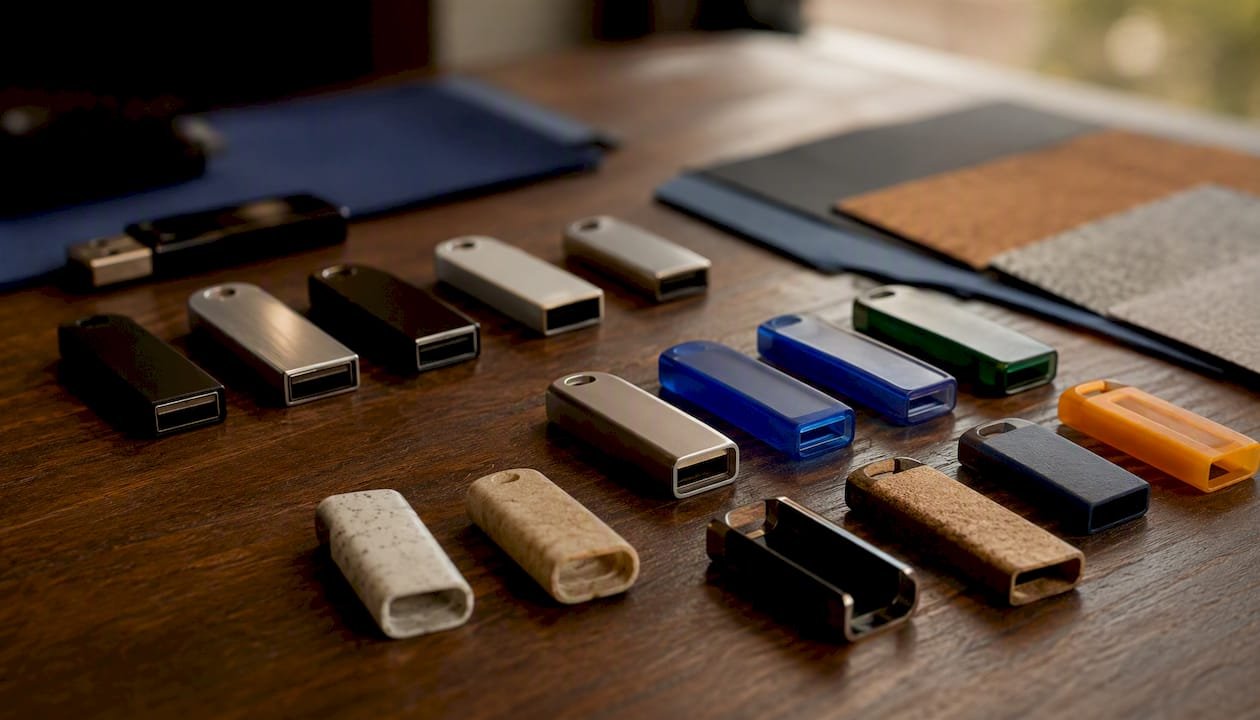
Form factors range from swivel and cap-style to credit-card, key-shaped, and fully custom-molded novelty shapes, and each one carries different trade-offs for budget, durability, and campaign fit.
Common styles:
- Swivel (rotate): The cap-free classic. The connector rotates out from the body. Durable, pocket-friendly, and available in nearly every material. Discountswag’s Rotate Flash Drive is a practical example of this format with standard imprint options.
- Cap-style: A removable cap protects the connector. Simple and economical, but caps get lost.
- Retractable/slider: The connector slides in and out mechanically. No loose parts; slightly higher unit cost.
- Credit-card / business-card drive: Flat, wallet-sized, and easy to slip into a press kit or mailer. Excellent for media distribution and first impressions.
- Keychain drive: Built-in loop or ring. High repeat-use potential because recipients keep it on their keys.
- USB-C models: Same style options as USB-A, just with a USB-C connector. Increasingly requested for corporate audiences.
- Custom-molded / novelty shapes: A 3D shape built to match a product, mascot, or logo. High perceived value and strong brand recall, but requires a custom mold, which adds tooling cost and lead time.
Materials:
- Plastic: Lightest and least expensive. Wide color range. Pad printing adheres well. The default choice for high-volume budget runs.
- Metal / aluminum: Heavier, more premium feel. Laser engraving looks sharp on brushed aluminum. Preferred for client gifts and executive kits.
- Wood: Warm, tactile, and distinctive. FSC-certified wood options exist for sustainability-focused brands. Laser engraving on wood produces a natural, high-contrast result.
- Rubberized / soft-touch: A rubber coating over plastic. Comfortable to hold; resists fingerprints. Popular for tech-brand campaigns.
- Recycled plastic: Made from post-consumer resin. Increasingly available from suppliers with sustainability programs.
For trade-show giveaways, a swivel or keychain drive in a bold brand color tends to outperform novelty shapes on cost-per-impression. Save the custom mold for VIP client gifts where the premium signals something.
How do storage size and USB version affect your order?
Capacity and protocol version are the two specs buyers most often get wrong, either over-specifying or defaulting to whatever’s cheapest without checking fit.
Practical capacity guidance:
- 2–4 GB: Documents, PDFs, presentation decks, and small image galleries. Covers most press kits and onboarding packets.
- 8–16 GB: Product videos (compressed), software installers, training modules, and mixed media packs.
- 32–64 GB: High-resolution video, large design asset libraries, or multi-course training content.
- 128 GB+: Rarely necessary for promotional use. The cost premium is hard to justify unless the content genuinely requires it.
The USB interface and protocol version determine real-world transfer speeds, and marketing materials sometimes quote peak theoretical speeds rather than sustained write speeds. A USB 3.0 drive loading 8 GB of video files will finish in under two minutes at full speed; the same transfer on a USB 2.0 drive takes closer to five. For recipients copying files off the drive, the difference is noticeable.
Compatibility notes:
- Windows, macOS, and Linux all support USB MSC natively, so plug-and-play works across platforms with no drivers.
- Drives formatted as exFAT work across Windows and macOS without reformatting; FAT32 is universally compatible but caps individual file size at 4 GB.
- Some older car stereos and AV systems only read FAT32 and may not recognize drives larger than 32 GB without reformatting.
- USB-C combined with USB 3.x is the forward-looking choice for corporate audiences using newer laptops, but include adapters or dual-head drives when your audience is mixed.
For most promotional campaigns, 8–16 GB at USB 2.0 is the practical sweet spot: enough storage for most rich media content, low unit cost, and universal compatibility.
How do businesses actually use custom USB drives?
The most effective uses match content size to capacity, form factor to context, and perceived value to recipient. Branded USB drives earn repeat use when they’re matched to content size and recipient expectations, which is why a 2 GB drive stuffed into a luxury gift box feels off while a 16 GB metal drive in a press kit feels right.
Campaign and media distribution:
- Press kits: Load a credit-card drive with a press release, high-res images, and a product video. Journalists keep physical media; a well-designed drive gets used again.
- Product launch packs: Preload a branded folder with spec sheets, demo videos, and a landing-page shortcut. Distribute at launch events or mail to key accounts.
- Music and portfolio distribution: Artists and agencies use preloaded drives as a physical portfolio piece. The drive itself becomes part of the presentation.
Events and trade shows:
- Trade-show giveaways: A swivel or keychain drive with the company logo and booth number. Practical enough to keep; branded enough to remember.
- Speaker handouts: Conference speakers load slide decks and resource links onto drives distributed to attendees. More reliable than QR codes in low-signal venues.
- Sponsor gifts and VIP kits: A metal or wood drive in custom packaging signals premium. Pair it with a corporate gift set for higher perceived value.
HR and onboarding:
- New-hire kits: Preload an onboarding drive with the employee handbook, benefits documents, training videos, and IT setup guides. Reduces printing costs and gives new hires something tangible on day one.
- Remote employee swag: A branded USB drive ships easily and works as both a practical tool and a welcome gift. See branded merchandise for onboarding for pairing ideas.
What drives the cost of a bulk USB order?
Pricing is more variable than most buyers expect, and the biggest surprises usually come from tooling fees, data-loading charges, and rush premiums that weren’t in the original quote.
Key pricing factors:
- Capacity: Higher GB = higher unit cost. The jump from 4 GB to 8 GB is modest; the jump from 32 GB to 64 GB is steeper.
- Imprint method: Pad printing is cheapest. Laser engraving adds a small premium. Full-color digital print and dye sublimation cost more per unit. Custom mold tooling is a one-time setup fee, often several hundred dollars, amortized across the run.
- Casing material: Plastic is the economy baseline. Metal and wood add cost. Recycled materials may carry a small premium depending on the supplier.
- Data preloading: Most suppliers charge per-drive or per-GB for factory data loading. Read-only partition setup is an additional service.
- Packaging: A poly bag adds almost nothing. A custom gift box with foam insert adds meaningful cost per unit.
- Rush fees: Standard production typically runs 7–14 business days after artwork approval. Rush options (3–5 days) carry a surcharge.
- Minimum order quantities (MOQ): Pad-printed standard shells often start at 25–50 units. Custom-molded shapes typically require 100–300 units minimum to cover tooling costs.
On samples and proofs: Always request a digital mockup before production and a physical sample before a large run. A digital mockup catches logo placement errors; a physical sample reveals color accuracy and finish quality. Approving a sample before full production is the single step most buyers skip and most regret skipping.
How does data preloading work, and what are the risks?
Preloading is straightforward in concept: files are copied to the drives at the factory or fulfillment center before shipping. In practice, a few details matter.
Preloading workflow:
- Files are provided by the buyer, organized into a folder structure template.
- The supplier performs a bulk transfer to all drives in the order.
- Checksum verification confirms that each drive’s contents match the master file set.
- Drives are labeled and packaged after verification.
Security and access controls:
- Read-only partitions: A section of the drive is write-protected at the firmware level. Recipients can read and copy files but cannot delete or overwrite them.
- Password protection: Software-based access control. Adds friction for recipients; useful for sensitive documents.
- Hardware encryption: Some drives offer AES encryption with a hardware controller. FIPS 140-2 validation is the benchmark for government and regulated-industry use, but most promotional drives do not carry this certification.
Legal and privacy cautions:
- Verify copyright clearance for every file preloaded onto drives you distribute. Music, stock images, and third-party software all carry licensing terms that may prohibit distribution on physical media.
- Scan all files for malware before loading. A supplier with a documented QA process should do this as standard, but confirm it.
- Avoid preloading personally identifiable information (PII) unless the drive is encrypted and the recipient is the data subject.
- Commercially, a USB drive is defined broadly as any removable USB-compatible storage product with an integrated connector, which means data-protection obligations follow the content, not the device category.
Pro Tip: For sensitive content, require your supplier to provide a checksum report and a documented wipe policy for any drives rejected during QA. A drive that fails verification should be wiped and destroyed, not returned to stock.
Artwork checklist: what to prepare before you order
Getting artwork right before production starts saves time, money, and the frustration of a reprint. Most suppliers will send a digital mockup, but the quality of that mockup depends entirely on what you send them.
File requirements:
- Vector files preferred: AI, EPS, or PDF with fonts outlined. Vector art scales to any size without quality loss.
- Raster files (if necessary): Minimum 300 DPI at the actual print size. A 72 DPI web logo will not print cleanly.
- Color mode: CMYK for full-color digital printing. Pantone (PMS) spot colors for pad printing when color accuracy is critical. RGB files need conversion before production.
- Background: Supply the logo on a transparent background (not white) so the supplier can place it correctly on the casing color.
Dimensions and safe zones:
- Confirm the imprint area dimensions for your chosen form factor. A swivel drive typically has a small flat panel; a credit-card drive has a much larger printable surface.
- Keep critical elements (logo, tagline) inside the safe zone, away from edges and the connector housing.
- File naming: use a clear convention, e.g.,
BrandName_LogoColor_CMYK_v2.ai.
Proof approval steps:
- Receive digital mockup from supplier.
- Check logo placement, color, and scale against the imprint area.
- Approve or request revisions in writing.
- For large orders, request a physical sample before full production run.
- Sign off on the physical sample before the supplier proceeds.
What are the eco-friendly options for custom USB drives?
Sustainability is a legitimate differentiator for brands whose audiences care about it, but the claims require scrutiny.
Available sustainable options:
- Recycled plastic casings: Made from post-consumer resin (PCR). Reduces virgin plastic use. Color options may be more limited than standard ABS plastic.
- FSC-certified wood: Sourced from responsibly managed forests. Laser engraving on wood produces zero ink waste.
- Biodegradable packaging: Kraft paper boxes, seed paper inserts, or minimal packaging reduce waste at the recipient end.
- Minimal packaging: Eliminating foam inserts and plastic windows in favor of a simple cardboard sleeve cuts material use significantly.
Trade-offs to know:
- Recycled plastic can limit color fidelity. If your brand color is a precise Pantone match, recycled casings may not hit it accurately.
- Custom-molded recycled drives often have longer lead times because fewer mold suppliers work with PCR materials.
- Wood drives are more susceptible to moisture damage than metal or plastic. Avoid them for outdoor events in humid climates.
Questions to ask your supplier:
- What percentage of recycled content is in the casing, and is it post-consumer or post-industrial?
- Does the wood carry FSC or equivalent certification?
- What is the recommended end-of-life disposal method for the drive?
Pro Tip: If you can’t verify a sustainability claim with a certification or a percentage, don’t lead with it in your campaign messaging. “Made with recycled materials” backed by a supplier certificate is credible. “Eco-friendly” with no documentation is a liability.
What should you expect from a reputable USB drive supplier?
A good supplier makes the process predictable. A risky one makes it expensive.
What a reputable supplier provides:
- Published specs: Capacity, USB version, controller grade, and casing material listed on the product page, not just “available upon request.” Discountswag’s Rotate Flash Drive listing shows the kind of product detail buyers should expect as standard.
- Sample availability: Physical samples before full production. Any supplier unwilling to provide a sample for a large order is a red flag.
- Artwork proofs: Digital mockups as standard, with a clear revision process and written approval before production starts.
- Transparent MOQ and pricing: Clear minimum order quantities and itemized pricing that includes imprint setup, data loading, and packaging, not just the unit price.
- Documented lead times: Stated production timelines that account for artwork approval, production, and shipping, with rush options clearly priced.
- QA process for preloads: Checksum verification, malware scanning, and a wipe policy for rejected drives.
- Warranty terms: A clear policy on defective units, including replacement or credit terms.
Signals of a risky supplier:
- No physical sample option
- Pricing that excludes setup fees until checkout
- No stated production timeline
- Vague answers about NAND grade or controller specs on high-value orders
For large custom mold orders, ask for production photos at the tooling stage. It’s a reasonable request, and a confident supplier will accommodate it. Checking third-party reviews on Google or industry forums adds another layer of confidence before committing to a large run. See how to choose corporate swag that works for a broader procurement checklist.
What most buyers get wrong about custom USB drives
The most common mistake is treating the USB drive as the centerpiece of a campaign when it’s actually the delivery mechanism. Buyers spend hours debating a custom-molded shape, then ship it preloaded with a 200 KB PDF that could have been emailed. The shape adds cost and lead time; the content is what the recipient actually uses.
The second mistake is underestimating lead time. A standard pad-printed swivel drive on a stock shell can ship in 5–7 business days after artwork approval. A custom-molded drive in a new shape needs tooling, which typically adds 2–3 weeks before production even starts. Ordering a novelty shape for a conference two weeks out is how campaigns go wrong.
The third is over-buying capacity. An 8 GB drive costs more than a 4 GB drive, and if your content pack is 1.2 GB, that headroom is invisible to the recipient. Map your actual file sizes first, add a reasonable buffer, then order the next capacity tier up. Spending the saved budget on better packaging or a higher-quality casing material will do more for perceived value than unused gigabytes.
One practical shortcut: ask your supplier for a preloaded sample with your actual content before approving the full run. It takes an extra few days but catches formatting issues, auto-run compatibility problems, and folder structure errors before they’re replicated across 500 units.
Discountswag makes bulk USB orders straightforward
Discountswag handles the full custom USB drive process: product selection across multiple styles and capacities, artwork setup and digital proofing, factory data preloading, and fulfillment to single or multiple addresses. For marketing managers and procurement teams, that means one vendor for the drive, the branding, the content load, and the shipping, rather than coordinating three separate suppliers.
Two things buyers consistently flag: transparent bulk pricing with no hidden setup surprises, and rush ordering for campaigns that didn’t get planned six weeks out. Both are built into how Discountswag operates. Whether you’re sourcing 50 drives for a client gift or 500 for a trade-show floor, the promotional items for brand awareness guide is a practical starting point for scoping your order. Ready to get a quote? Browse the full range at Discountswag’s branded merchandise catalog and start your order today.
Sources
- SanDisk USB flash drives
- What types of interfaces do USB flash drives have? – YOUSAN USB
- List of 14 Different USB Drive Types Explained Simply
 Bottle Carriers
 Mugs
Mugs